

When I use an open-weight model, I see results that are nowhere close to what the quality benchmarks indicate.
Tool call accuracy is an important part of serving open-weight models. When your tool calls aren’t accurate, the model builds up on nonsensical context. This leads to low quality results, particularly for agentic workloads where multi-turn sessions are common.
To help address this issue, the team behind Kimi launched the Kimi Vendor Verifier (KVV) benchmarks. These benchmarks enable providers to verify that they are serving Kimi true to the original; and one of these benchmarks focuses on tool-call accuracy. Sadly, many providers and widely-used inference engines don’t fully pass this test. For example, when we served Kimi K2.6 with vLLM version 0.28, we got the expected tool call schema only 92% of the time. In other words, 2 out of every 25 attempted tool calls failed.
Fortunately, vLLM recently added support for constrained decoding, a technique to guarantee schema-adherence. This feature has then been released as a server-side flag in vLLM 0.31. By enabling it, you can get to 100% schema accuracy with the newer Kimi and DeepSeek models.
In this blog post, we first describe tool call schema accuracy and why it’s important in serving agentic workloads. We then talk about constrained decoding and how it fixes the schema accuracy problem.
You can enable an LLM to call an external tool in two steps: (1) inform the AI model about the existence of externally available tool calls and (2) provide the model with instructions on how to output structured tool-calls. For example, when connecting OpenCode to Kimi, OpenCode sends Kimi a JSON array describing available tools. One of the tools in this list is webfetch, which fetches Web page contents:
[{
  "type": "function",
  "function": {
    "name": "webfetch",
    "description": "- Fetches content from a specified URL\n- Takes a URL and optional format as input\n- Fetches the URL content, converts to requested format (markdown by default)\n- Returns the content in the specified format\n- Use this tool when you need to retrieve and analyze web content\n\nUsage notes:\n  [content redacted for brevity]\n",
    "parameters": {
      "$schema": "https://json-schema.org/draft/2020-12/schema",
      "type": "object",
      "properties": {
        "url": {
          "type": "string",
          "description": "The URL to fetch content from"
        },
        "format": {
          "type": "string",
          "enum": [
            "text",
            "markdown",
            "html"
          ],
          "description": "The format to return the content in (text, markdown, or html). Defaults to markdown.",
          "default": "markdown"
        },
        "timeout": {
          "type": "number",
          "description": "Optional timeout in seconds (max 120)"
        }
      },
      "required": [
        "url"
      ]
    }
  }
}, ...]
The inference engine then wraps this JSON description in LLM-specific tokens before passing it into the LLM, to match how the LLM was trained to recognize tool declarations. When serving Kimi, this looks something like:
<|im_system|>tool_declare<|im_middle|>[{"type":"function","function":{...}, ...]<|im_end|>The JSON object describing the tool (or function, in the JSON above) includes the tool’s parameters, their types, which of the parameters are required, etc. This is known as the tool’s schema. For an agent harness (e.g., OpenCode) to successfully execute a tool call generated by the LLM, the call must follow the rules specified in its schema.
Then, when a user asks to fetch a Web page via their agent harness, the LLM may output the following tokens:
I'll fetch that page. <|tool_calls_section_begin|><|tool_call_begin|>functions.webfetch:0<|tool_call_argument_begin|>{"url": "https://ubicloud.com", "format": "markdown"}<|tool_call_end|><|tool_calls_section_end|>These tokens are parsed by the inference server’s parser, extracting the LLM-specific tokens and turning the call into a JSON object such as:
{
  "role": "assistant",
  "content": "I'll fetch that page.",
  "tool_calls": [
    {
      "id": "functions.webfetch:0",
      "type": "function",
      "function": {
        "name": "webfetch",
        "arguments": "{\"url\": \"https://example.com\", \"format\": \"markdown\"}"
      }
    }
  ]
}
This is then sent back to your harness (OpenCode, in our example), which runs its webfetch tool and sends its output back to the model.
For a tool-call to succeed, the call must adhere to the tool’s schema.
The simple approach to tool calling is to let the model generate tool calls freely and trust that the model’s training is sufficient to generate correct calls. This is similar to how we trust the model to generate syntactically correct prose.
The simple approach works most of the time because modern models are good at following structured patterns. But success “most of the time” implies that many tool calls can still fail, resulting in context window pollution due to error messages, lower model performance, and increased cost due to the agent having to retry the call one or more times.
To avoid such experiences when using Kimi, Moonshot AI published their K2VV ToolCall benchmark. This benchmark lets providers verify that they serve Kimi with the same quality as the original, including its default behavior of only generating valid tool calls.
K2VV ToolCall’s workload consists of 2000 requests selected to evaluate when the LLM generates tool calls and whether the generated tool calls are syntactically correct (i.e., adhere to the provided schema). The benchmark allows analyzing the model’s quality by quantifying two metrics: trigger similarity and schema accuracy. Trigger similarity considers when the service decides to trigger a tool call, and how similar its decisions are to Moonshot AI’s own service. Schema accuracy quantifies the fraction of tool-calls that adhere to the tool’s schema and can therefore be invoked successfully. For example, when tool-call accuracy is 50%, half of the tool calls generated by the model are malformed.
Schema accuracy usually falls short due to the probabilistic nature of language models. A model generates tokens based on likelihood. It is not running a compiler or type checker. Even with a clear prompt, it can still produce malformed tool calls. This can be caused by, for example, a mismatch between the model’s training data and the current inference harness. Models are trained on many tool-calling datasets, each with its own tools, schemas, and conventions. As a result, a model may generate a tool or field name that it has seen during the training, even if it does not exist in the current production environment. For example, it may generate search_web when the available tool is web_search, or use city_name when the active schema expects location.
An LLM computes for each token the probability that it is the next in the sequence. It then selects the next token by performing a weighted sample. Constrained decoding avoids malformed tool calls by preventing models from sampling tokens that would result in a syntactically invalid tool call. When using constrained decoding, instead of letting the model sampling tokens freely and validating the result afterward, the inference engine guides generation step by step. At each step, only valid tokens are allowed.
Which tokens are allowed is determined by the provided tool schema. vLLM implements this using structural tags from the XGrammar library. The snippet below shows an excerpt of how XGrammar implements constrained decoding in Kimi K2.6. It defines the valid structure of a tool call, including where the call begins, where the index appears, where the arguments begin, and where schema-constrained JSON must be generated.
# Kimi K2.6 tool call syntax:
# <|tool_call_begin|>{function.name}:{index}
# <|tool_call_argument_begin|>{arguments}
# <|tool_call_end|>
TagFormat(
    begin=f"{TOOL_CALL_BEGIN_PREFIX}{name}{TOOL_CALL_SUFFIX}",
    content=SequenceFormat(
        elements=[
            RegexFormat(pattern=r"\d+"),
            ConstStringFormat(value=TOOL_CALL_ARGUMENT_BEGIN),
            JSONSchemaFormat(
                json_schema=parameters,
                any_order=any_order,
                max_whitespace_cnt=max_whitespace_cnt,
            ),
        ]
    ),
    end=TOOL_CALL_END,
)
You can find the full implementation here.
With this definition, generation must follow a valid path:
Begin tool call → Tool name → Tool call index → Begin arguments → Schema-constrained JSON → End tool call
Invalid paths are blocked during generation. For example, when generation reaches the tool-call index phase, the engine restricts sampling to integer tokens and masks out everything else. The figure below, reproduced from XGrammar’s article, provides a good visualization of how invalid tokens are masked.
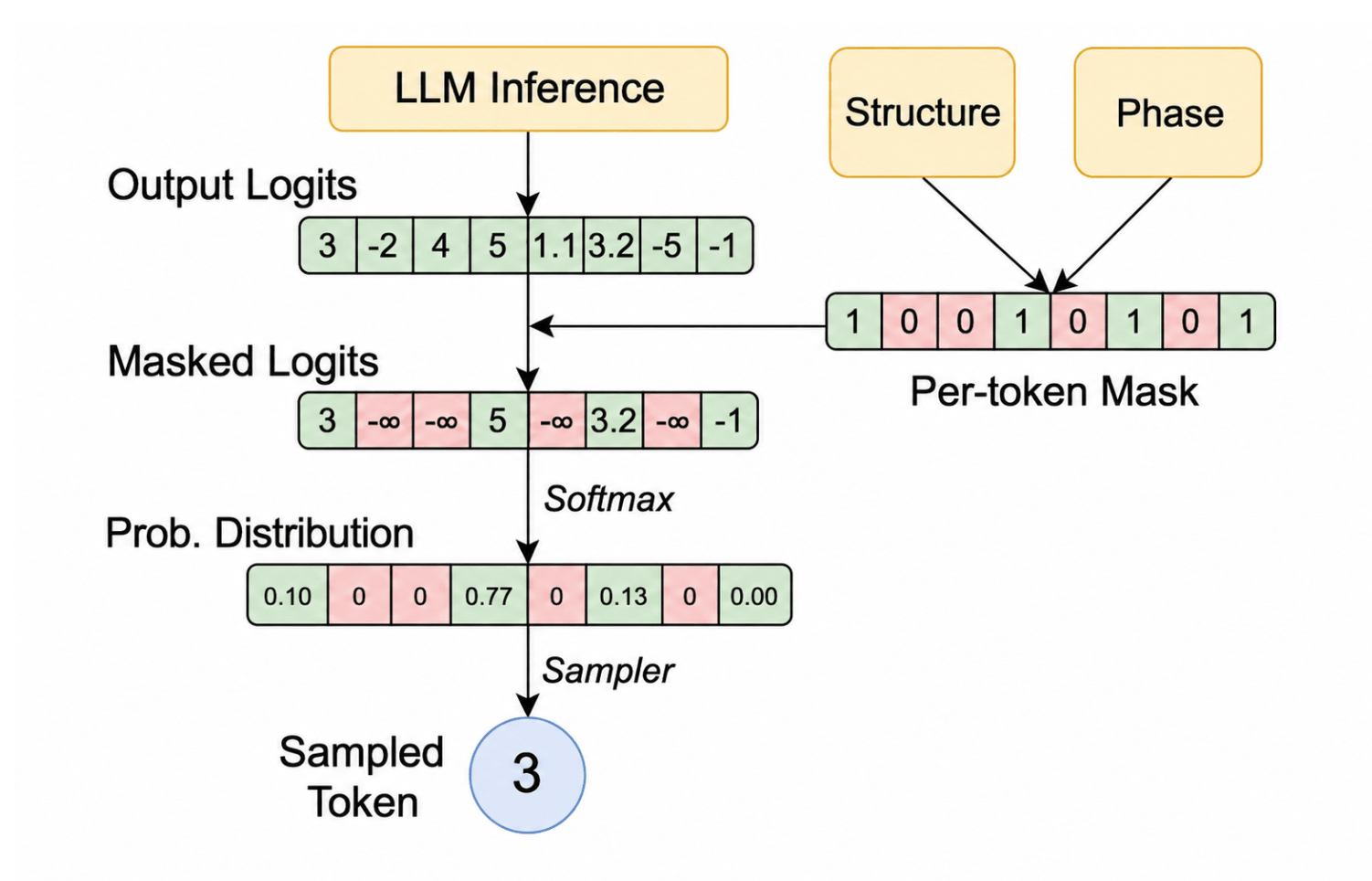
Source: Dong, Yixin, et al. "XGrammar: Flexible and efficient structured generation engine for large language models." Proceedings of Machine Learning and Systems 7 (2025). [link]
This changes schema accuracy from a best-effort approach to a runtime guarantee. The model still decides which token to generate, but now the token is selected from a restricted and syntactically-correct set.
Notably, this runtime enforcement adds negligible performance overhead. By precomputing token masks for each phase, and applying them efficiently on the GPU during generation, XGrammar guarantees correct tool calls without trading off significant performance.
Moonshot AI recommends constrained decoding to be turned on and its own API behaves as such. So we initially added constrained decoding in our fork of vLLM. After vLLM added this feature in v0.25, we switched to using this feature from upstream for Kimi and DeepSeek. Unfortunately not long after, we found out that our tool-call accuracy score dropped back to 91%!
After analyzing the problem, we confirmed that vLLM’s implementation of constrained decoding was still correct. Instead, we found that vLLM changed its default behavior for requests that do not explicitly turn constrained decoding on. This is primarily because vLLM is designed to support a wide range of models. Supporting constrained decoding is a per-model task and problems fall into three camps:
Due to these issues, vLLM maintainers reported seeing problems with several models after constrained decoding was enabled. This made disabling constrained decoding by default the safer option for a model-agnostic serving engine such as vLLM. Later, vLLM added the --tool-strict-level flag so that users can enable tool-call strictness for their deployments.
Ubicloud’s focus is different from that of vLLM however. We focus on serving Kimi and DeepSeek models with the quality that users expect from first-party providers. For this reason, we enabled constrained decoding and re-ran the K2VV ToolCall benchmark. Once we verified 100% tool-call schema accuracy across all served model versions, we deployed the change to production. We then typed up this blog post to share our learnings.
When using LLMs, the quality you observe isn’t based on the model alone. The inference engine also plays an important role. Change the inference engine and its settings, and you change the model’s output quality.
When serving Kimi K2.6 and DeepSeek V4 Flash, we observed visible quality degradations due to tool-call schema inaccuracies. We solved this problem by first carrying our own vLLM fork and then enabling the new constrained decoding feature in vLLM. This helped improve our tool-call accuracy in the K2VV ToolCall benchmark from 92% to 100%.
In this blog post, we shared our experience with tool calling and constrained decoding. If this is interesting or you’d like to share war stories about serving models, please drop us a line in our support email.


