

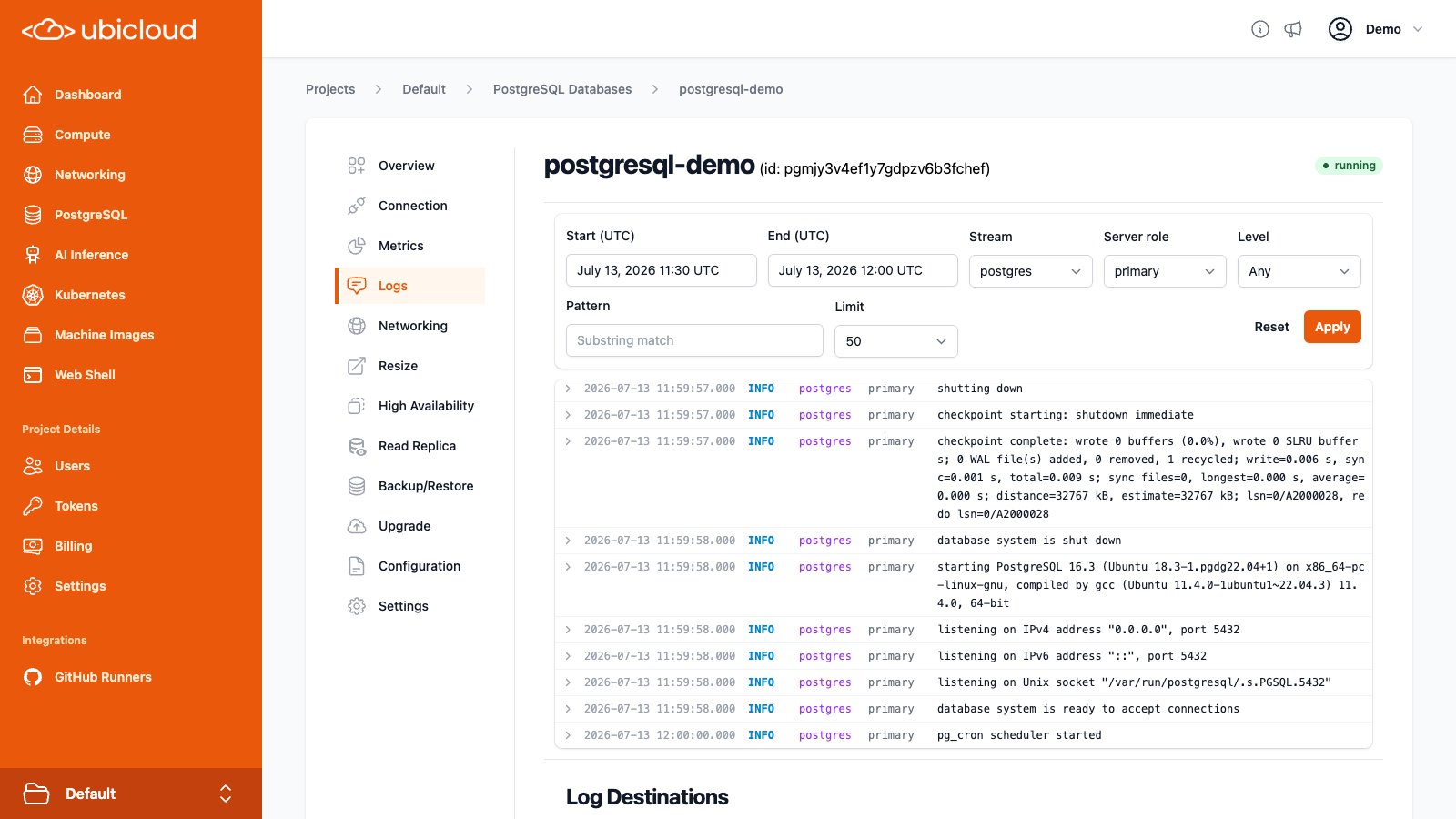
Browsing Logs
The Logs tab on the PostgreSQL details page provides a searchable view over recent log lines from your instance. By default, it shows the last 30 minutes of logs from thepostgres stream on the primary server.
Logs are retained for up to 7 days. A single query can span at most 24 hours
of that range.
Filters
The following filters are available at the top of the Logs view:- Start / End (UTC): The time range to query. Defaults to the last 30 minutes. The range must be at most 24 hours and cannot start more than 7 days in the past.
- Stream: The source of the log line.
postgres— log lines emitted by the PostgreSQL server itself.pgbouncer— log lines from the PgBouncer connection pooler.upgrade— log lines from in-place major version upgrades.
- Server role:
primaryorstandby. For instances with HA enabled, this selects which server’s logs to display. - Level: Filter by severity. One of
DEBUG,INFO,WARN,ERROR, orFATAL. - Pattern: A substring to match against the log message. Up to 200 characters.
- Limit: The maximum number of log lines to return. One of 50, 100, 250, or 500.
Reading log entries
Each row shows the timestamp (UTC), severity level, stream, server role, and the log message. Severity levels are color-coded —ERROR and FATAL are
shown in red, WARN in yellow, and DEBUG in gray.
Rows with additional context (such as pid, dbname, user, app_name, or
remote_host_port) can be expanded to reveal those fields.
If more matching logs are available than fit within the selected time range, a
banner at the top of the results lets you load the next page or suggests
increasing the limit.
Log Destinations
You can forward logs from your Ubicloud PostgreSQL instance to an external destination for long-term retention, alerting, or correlation with the rest of your observability stack. Logs are shipped by an OpenTelemetry Collector running alongside the database.
- OTLP HTTP: Sends logs to an OTLP-compatible HTTP endpoint over HTTPS.
Authentication is performed via HTTP headers (e.g., an
Authorizationheader or a vendor-specific API key header). - Syslog (RFC 5424 over TLS): Sends logs as RFC 5424 messages over a TLS TCP connection. Authentication is performed via syslog structured data elements, which many providers use to identify the account or stream.
postgres, pgbouncer, or
upgrade), the server’s ubid as the instance, and the server role
(primary or standby). For postgres stream entries, additional
attributes such as pid, dbname, user, app_name, and
remote_host_port are included when available.
Only https:// URLs are accepted for OTLP destinations, and only tcp://
URLs for syslog destinations. In both cases, data is encrypted in transit.
Adding a Log Destination
Open the Log Destinations tab on your PostgreSQL instance’s details page. The Add Log Destination section provides a form to configure a new destination:- Provider: Select your logging provider from the dropdown. Presets are available for common providers such as Grafana Cloud, Datadog, New Relic, Honeybadger, Better Stack, Sumo Logic, OpenObserve, Mezmo, Loggly, Logentries, and Papertrail. Selecting a preset fills in the destination type, endpoint, and required authentication fields for you. You can also pick Generic OTLP HTTP or Generic Syslog to configure a destination manually.
- Name: A name to identify this destination.
- Endpoint: The destination URL. The protocol prefix (
https://for OTLP ortcp://for syslog) is fixed based on the selected type. - Authentication: For OTLP destinations, add the HTTP headers required by
your provider (e.g., an
Authorizationor API key header). For syslog destinations, add the RFC 5424 structured data elements your provider uses for authentication.
ubi CLI.
Listing and Removing Log Destinations
The Log Destinations tab lists all configured destinations along with their name, type, and endpoint. To remove a destination, use the delete button next to it. Log destinations can also be listed and removed via the API and CLI.Tested Providers
Log destinations use the OTLP HTTP and RFC 5424 syslog protocols and should work with any provider that supports them. The following providers have been verified end-to-end:- Mezmo
- OpenObserve
- Honeybadger